Lucie (from MNT) has found a better way to run PrusaSlicer on the Pocket Reform with full GL rather than using GL ES. I’m leaving this post up in case this is useful for other platforms. But for the Pocket Reform, try:
LD_PRELOAD=/usr/lib/aarch64-linux-gnu/libGLEW.so.2.2 prusa-slicer –opengl-compatibility
(I found I was using libGLEW 2.3, so adjusted accordingly).
My current portable machine is a MNT Pocket Reform with a RK3588 ARM processor. The Pocket Reform ships with Debian Sid which has PrusaSlicer available in the repos, but the current version of PrusaSlicer requires OpenGL 3.2 which isn’t supported by the Mali GPU.
You can force software rendering mode, and this is fine until you slice a model at which point it grinds to a halt.
export LIBGL_ALWAYS_SOFTWARE=1
DavidK hosts a set of AppImages, built for ARM and patched for OpenGL ES, which can be used on Raspberry Pi OS and Debian Stable/Testing but as of a few days ago, are broken on Sid due to libgdk-pixbuf-2.0 version changes. Since DavidK is targeting the Raspberry Pi, I have no expectations of updated builds until Raspberry Pi OS’s version of libgdk-pixbuf is updated.
You can however take the patches from DavidK’s version and build your own.
1. Install dependencies.
(I’ve listed this dependency list directly from the PrusaSlicer ; build instructions.) I suspect that by now there are significantly more dependencies that I’ve lost track of. If you manage to work out the full list, I’ll be happy to update.
sudo apt-get install  -y \
git \
build-essential \
autoconf \
cmake \
libglu1-mesa-dev \
libgtk-3-dev \
libdbus-1-dev \
libwebkit2gtk-4.1-dev \
texinfo
2. Install gcc-14, and switch your version to gcc-14.
sudo apt update
sudo apt install gcc-14 g++-14
sudo update-alternatives --install /usr/bin/gcc gcc /usr/bin/gcc-14 100 --slave /usr/bin/g++ g++ /usr/bin/g++-14
sudo update-alternatives --config gcc
3. Download automake and install over the default version.
You can put this back later.
wget https://ftp.debian.org/debian/pool/main/a/automake-1.16/automake_1.16.5-1.3_all.deb
sudo dpkg -i automake_1.16.5-1.3_all.deb
4. Download the current version of PrusaSlicer.
Put it somewhere. Once PrusaSlicer has been built, you can’t move it, so choose wisely.
sudo mkdir /opt/prusaslicer
sudo chown user:user /opt/prusaslicer
cd /opt/prusaslicer
wget https://github.com/prusa3d/PrusaSlicer/archive/refs/tags/version_2.9.4.tar.gz
tar -zxf version_2.9.4.tar.gz
5. Download the patches from DavidK. Apply the patches.
cd /opt/prusaslicer
git clone https://github.com/davidk/PrusaSlicer-ARM.AppImage.git
cd /opt/prusaslicer/PrusaSlicer-ARM.AppImage/patches/version_2.9.4
cp * /opt/prusaslicer/PrusaSlicer-version_2.9.4/
git apply -v *.patch
6. Build PrusaSlicer dependancies.
cd deps
mkdir build
cd build
cmake .. -DDEP_WX_GTK3=ON
make
cd ../..
7. Build PrusaSlicer.
mkdir build
cd build
cmake .. \
-DSLIC3R_STATIC=ON \
-DSLIC3R_GTK=3 \
-DCMAKE_BUILD_TYPE=Release \
-DSLIC3R_OPENGL_ES=1 \
-DSLIC3R_PCH=OFF \
-DCMAKE_PREFIX_PATH=$(pwd)/../deps/build/destdir/usr/local
make -j4
8. Hopefully run.
cd src
./prusa-slicer
Setting up .desktop files is left as an exercise for the reader.
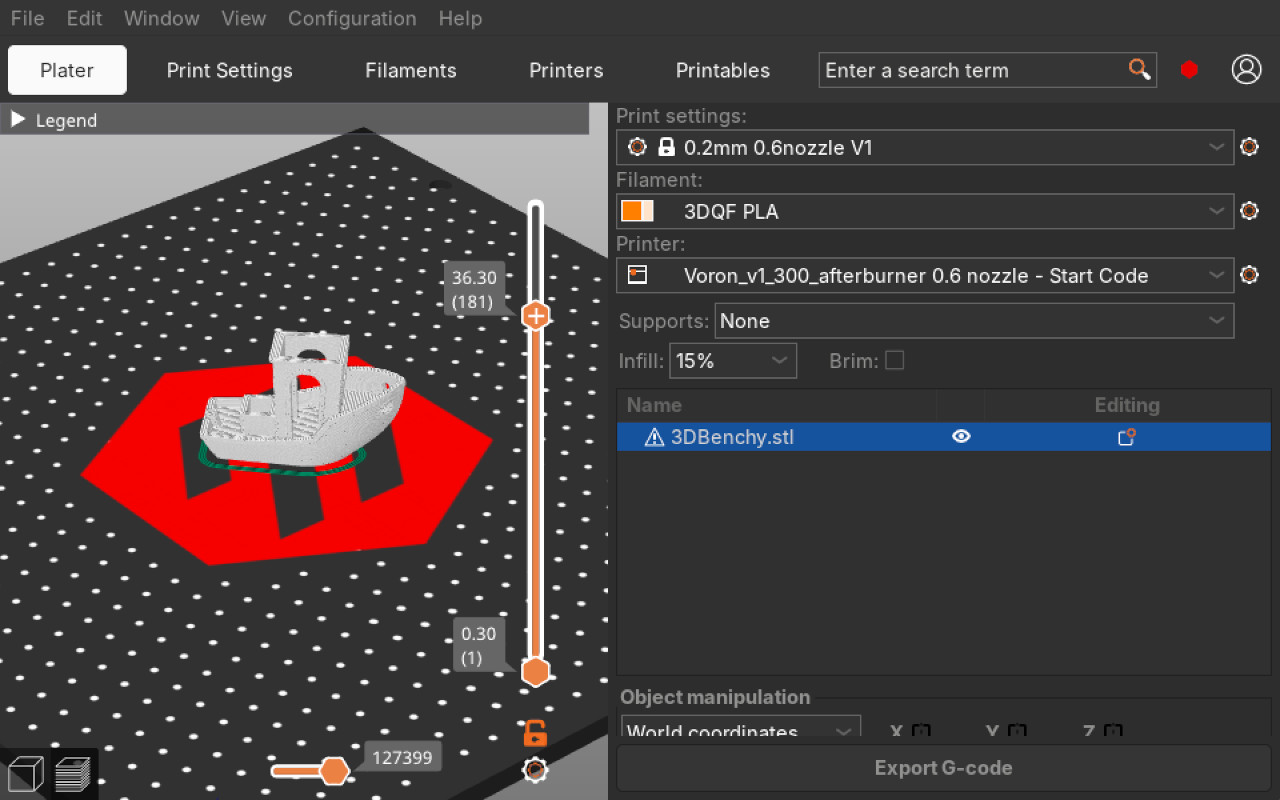
When you’re happy with your build remember to:
1. Reinstall current automake
sudo apt install automake
2. Switch your version of gcc back to default
update-alternatives --set gcc

 There are no ads on this blog and as far as I can remember, never have been.